Streaks Are for Boring Things
I was studying the UX design of Apple Books and noticed that at the bottom of the Home screen, there is a reading goal progress dial, followed by your current streak, and your longest streak. You keep the streak alive if you spend enough time reading in the Apple Books app to meet your goal.
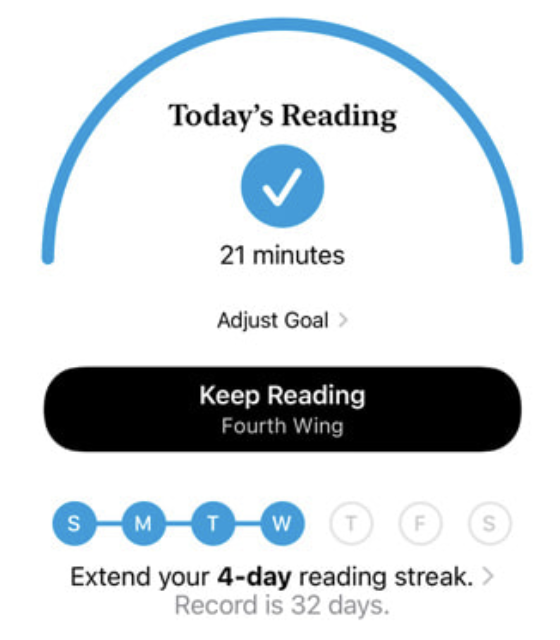
This streak design is not really a source of bragging rights, as there isn't much of a social element in Apple Books. There's no “my streak is longer than my frenemy's” badge of honor for readers to display.
At the same time, Duolingo's design has combined streaks with social to an extreme. You have your own streak. When you break your streak, your friend can save it for you by spending their own gems. When you pledge a streak of certain length and achieve the pledge, you get extra gems. You are also constantly nudged that your friend has achieved a crazy long streak. All this adds to the social pressure for the user to keep coming back to the game. (Duolingo has brought gamificaiton to another level. It's disrespectful if we don't call it a game.)
At the same time, Duolingo's design has combined streaks with social features to an extreme. You have your own streak. When you break your streak, your friend can save it for you by spending their own gems. When you pledge to maintain a streak of a certain length and fulfill the pledge, you get extra gems. You are also constantly reminded that your friend has achieved a remarkably long streak. All this adds to the social pressure on users to keep coming back to the game. (Duolingo has taken gamification to another level. It would be disrespectful not to call it a game.)
Now, what's interesting is that you only want to use the streak feature for activities that are traditionally considered boring or unengaging (reading, learning vocabulary).
If something is inherently engaging, you don't need a “streak” feature to remind users to come back. For example, you don't see a “streak” reminder splashed across TikTok's home screen.